Back to Writing
NOTESazure-functionsvisual-studiodotnettroubleshooting
Azure Functions in Visual Studio - Fixing NU1100 Package Error
July 2, 2023•Updated Feb 17, 2026
(As of 2023-07-02)
If you encounter errors like NU1100,
it may be a package-related issue.
Just like VS Code, Visual Studio comes with Microsoft.NET.Sdk.Functions 4.1.1 installed by default.
There is currently a conflict with this version.
Upgrading to the stable version 4.2.0 resolved the issue.
Here is how:
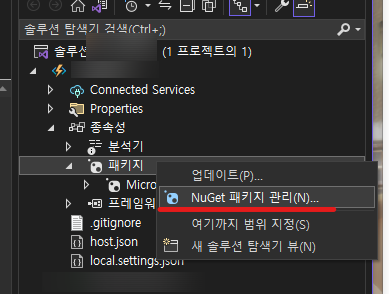
In Visual Studio's Solution Explorer, right-click on Packages,
Open the NuGet Package Manager window.